Eventbro
Eventbro
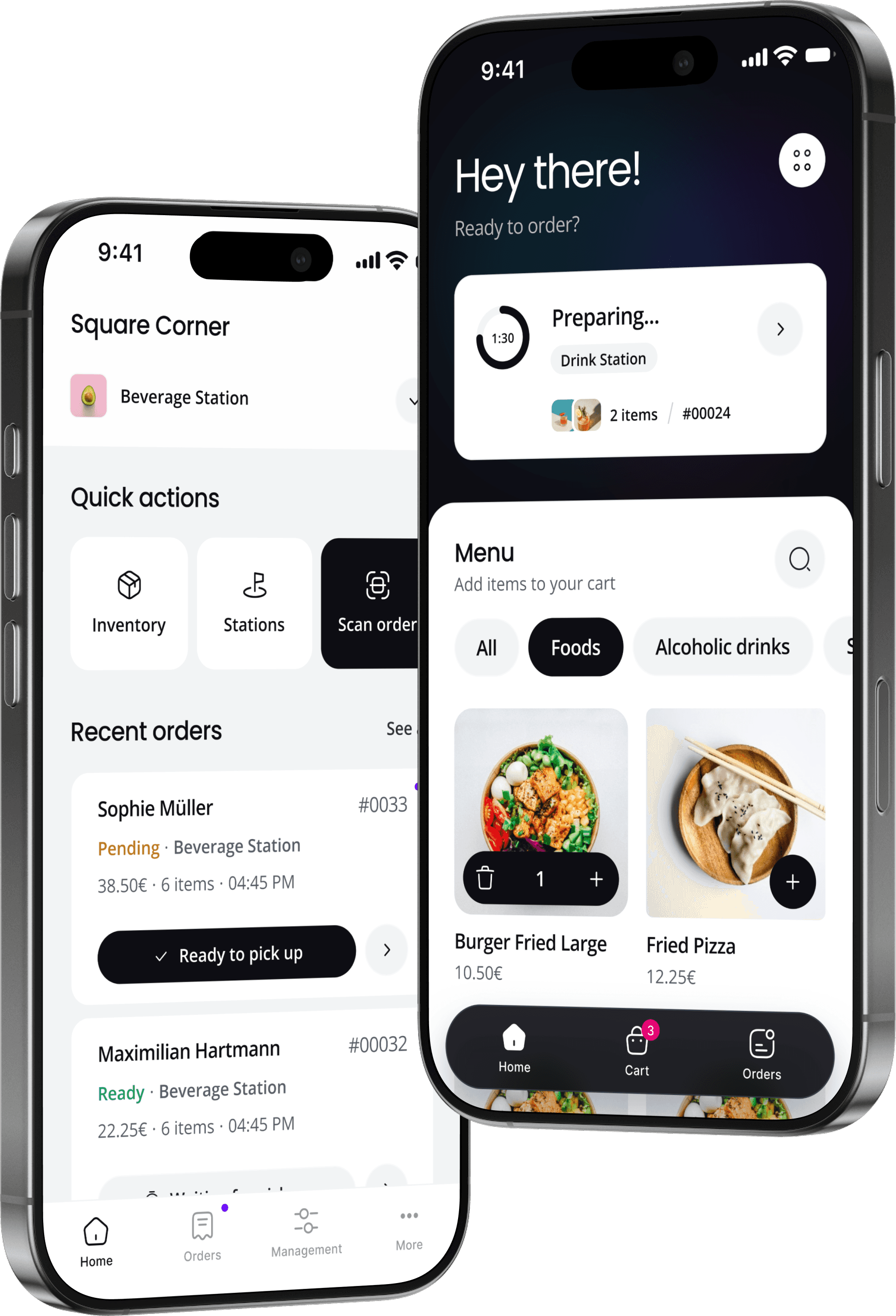
I designed a two-sided ordering system so festival guests stop waiting, and bartenders can actually keep up.
I designed a two-sided ordering system so festival guests stop waiting, and bartenders can actually keep up.
Shorter wait times
Shorter wait times
Shorter wait times
Positive feedback
Positive feedback
Positive feedback
Order to checkout
Order to checkout
Order to checkout
Info
Role
Sole Product Designer
Platforms
Web app, iOS/Android, Tablet
Timeline
3 months, part-time (2024)
Team
1 Designer, 2 Engineers, CPO
Website
01
Background
What I walked into
Ticketbro is a B2B booking platform and in 2024, the team wanted to expand into on-site ordering for festivals and events. The idea was straightforward: let guests order food and drinks from their phones instead of standing in line.
Mobile ordering at events wasn't new. But Ticketbro needed something that worked within their ecosystem, could launch fast, and was built specifically for the chaos of live events.
I was the only designer on the project. My scope covered everything: branding, product design for the guest-facing web app, a separate app for bartenders and staff, and a tablet dashboard for monitoring orders behind the bar. All of it needed to be ready for a real festival in three months, and this was a part-time engagement alongside my other work at Ticketbro
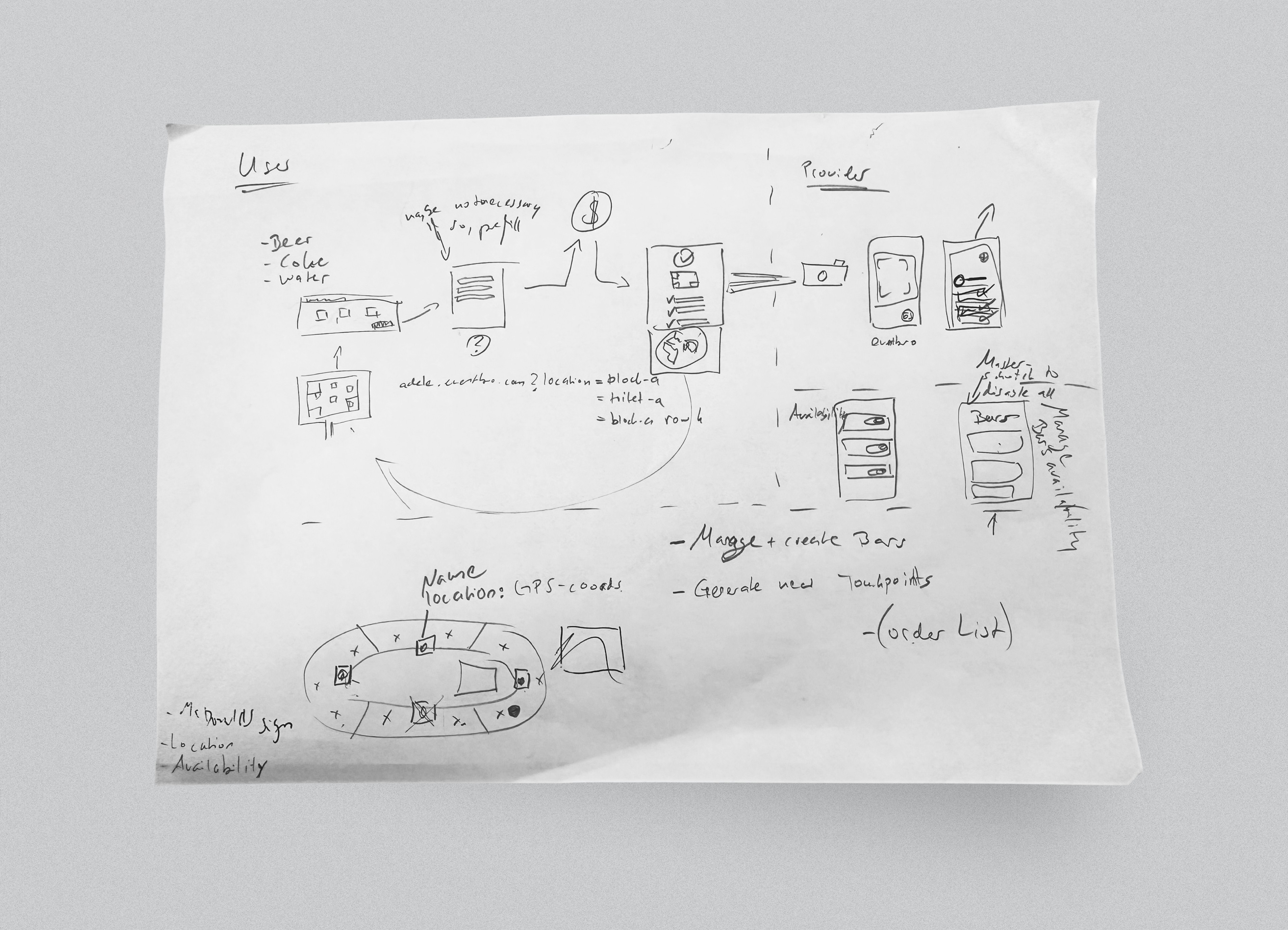
First session with the CPO. We mapped the two-sided system on paper before anything went into Figma.
The timeline didn't leave room for deep upfront research. So I talked to a handful of regular festival-goers and a bartender to validate the core pain points quickly. Three things came back clearly:
01
Guests hated waiting
Average wait: 6 to 25 minutes for a single drink.
02
Overwhelmed bartenders
Juggling orders, payments, and refunds at once.
03
Refund confusion
Handing cups back to bartenders for a refund slowed the line and created arguments.
With that, the team ran a short workshop to align on priorities and scope. Then I started designing.
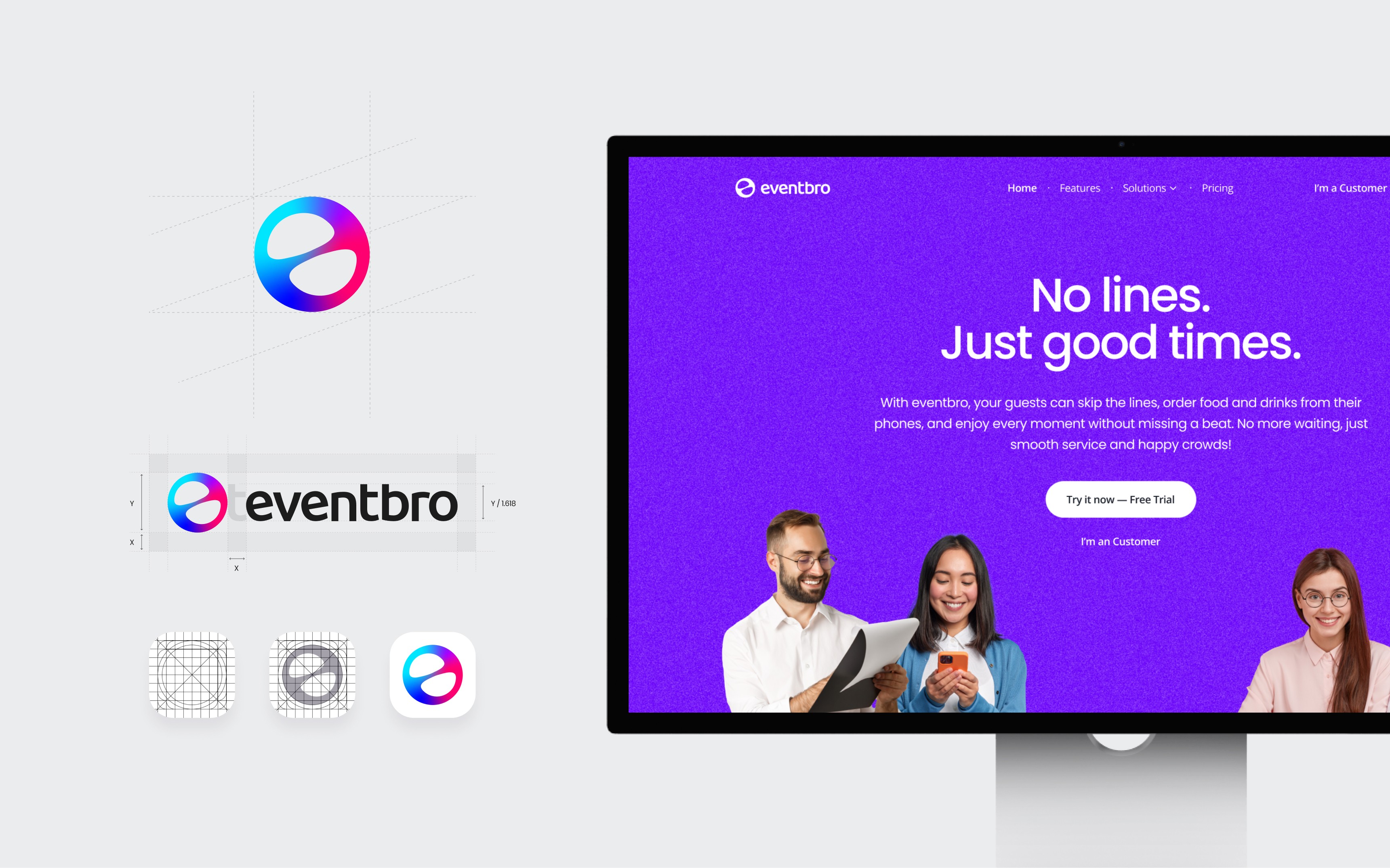
I created the Eventbro logo, brand identity, and website in parallel with the product work.
02
The problem
Two users, one system
How do you build one product that works for someone ordering a drink in a loud crowd and someone making that drink behind a bar?
The guest and the bartender need completely different things from the same system.
For
The guest
At a festival, on their phone, probably standing in sunlight or in the dark. Impatient, possibly a few drinks in. They've never seen this app before and won't read instructions. Everything needs to work on the first tap.
For
The guest
At a festival, on their phone, probably standing in sunlight or in the dark. Impatient, possibly a few drinks in. They've never seen this app before and won't read instructions. Everything needs to work on the first tap.
For
The bartender
Behind a bar during a rush. Hands are wet, orders are piling up, someone is yelling. They need to see what's coming, mark what's ready, and confirm pickups without slowing down. Detail matters, but so does speed.
These two users share one system but almost nothing else. The guest wants fewer steps. The bartender wants more control. The guest interacts once and leaves. The bartender lives in the app for hours.
Designing for one without breaking the other was the core tension of the entire project.
03
The system
The guest experience
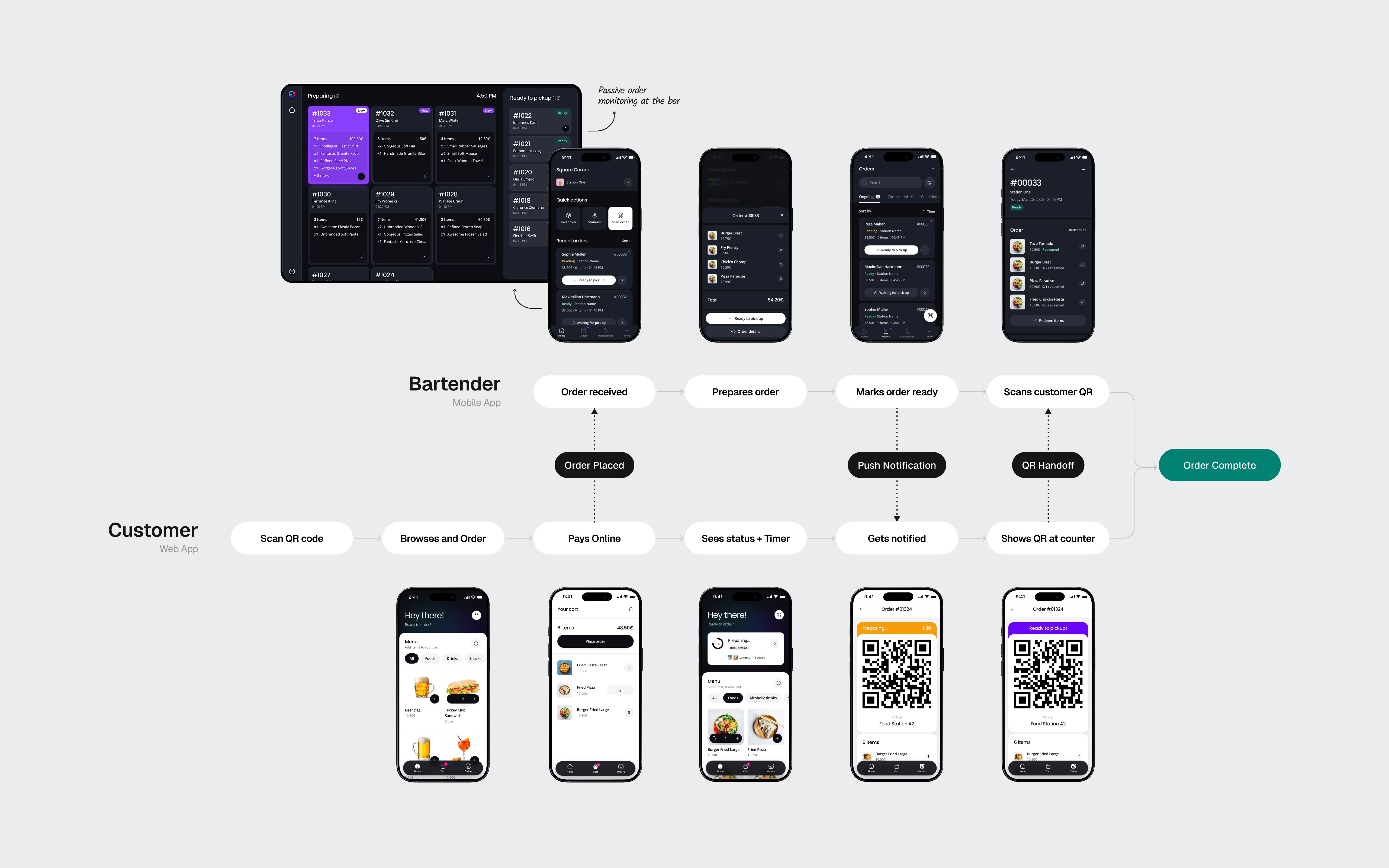
I structured the guest app around three tabs: Home (the menu), Cart, and Orders. No settings, no profile, no onboarding. The navigation is the user flow.
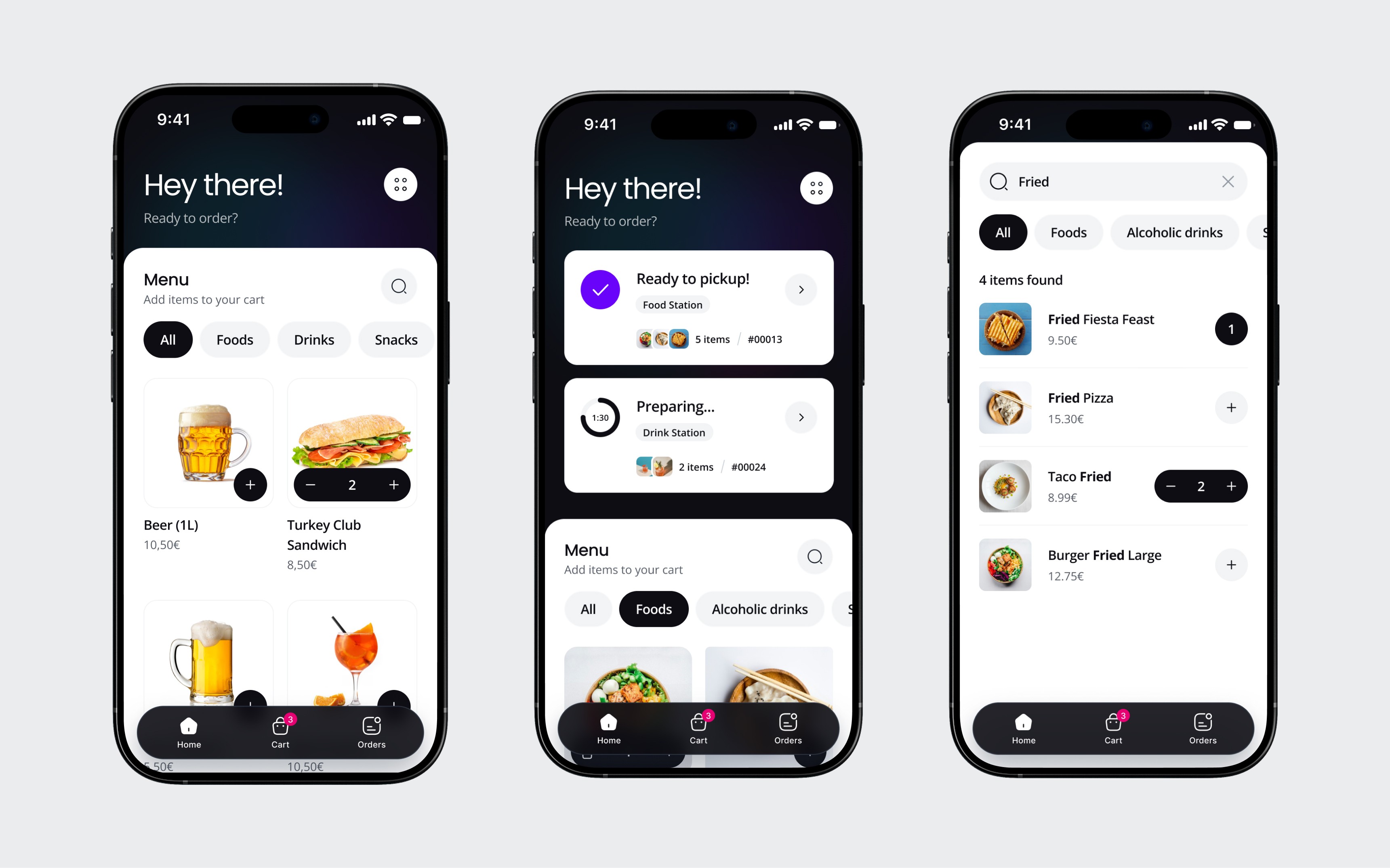
Home and menu
The home screen is the menu. No splash screen, no welcome flow. The guest lands and immediately sees what they can order. When an active order exists, a persistent status banner sits on top so the guest always knows where their order is without leaving the menu. This matters because people order more than once at a festival. The menu stays accessible even while they're waiting for a previous order.
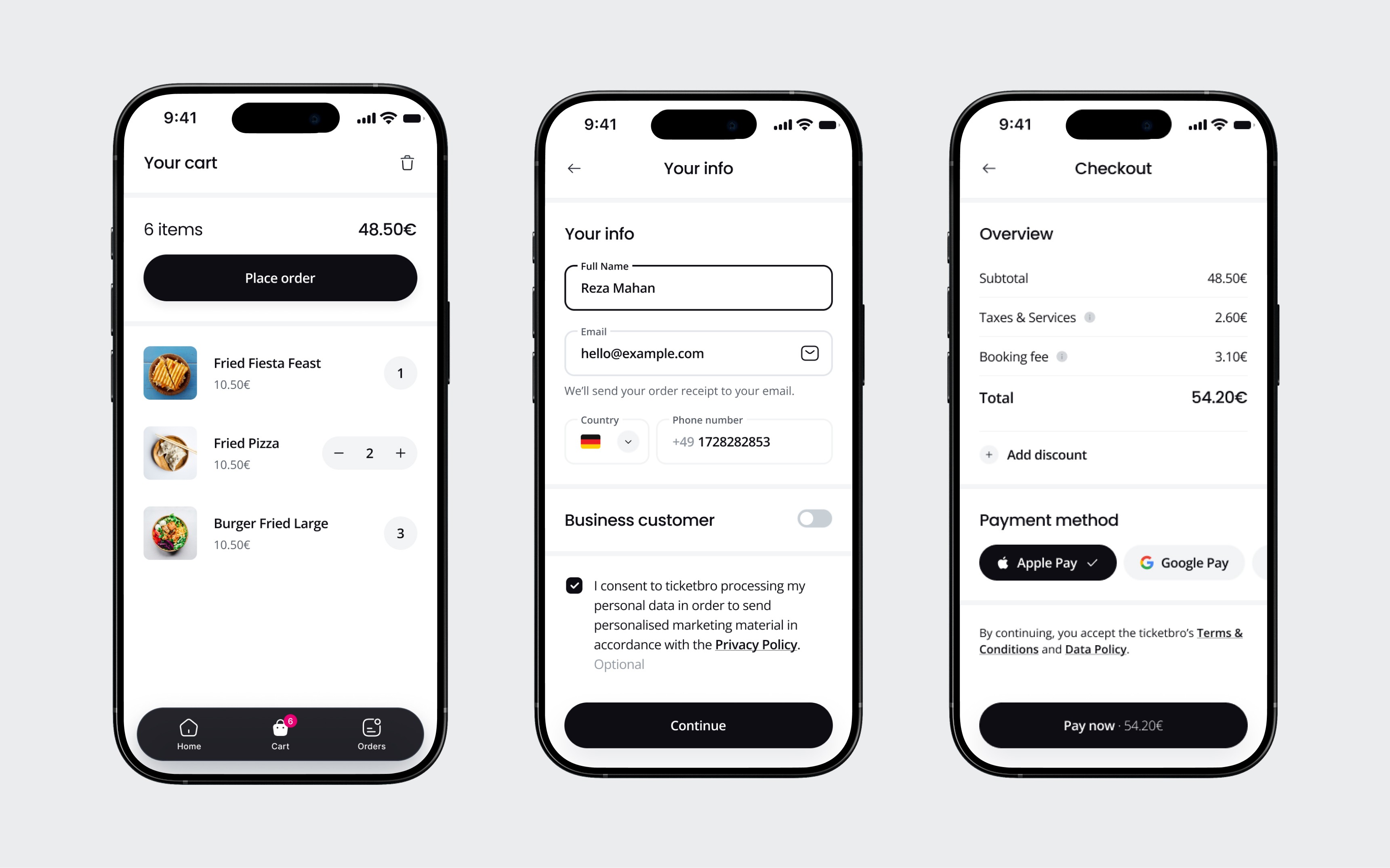
Cart and checkout
The cart is minimal: items, quantities, total, one button. Checkout asks for name, email, and phone, then goes straight to Apple Pay or Google Pay. No account creation. At a festival, every extra field is a reason to give up and walk to the bar instead.
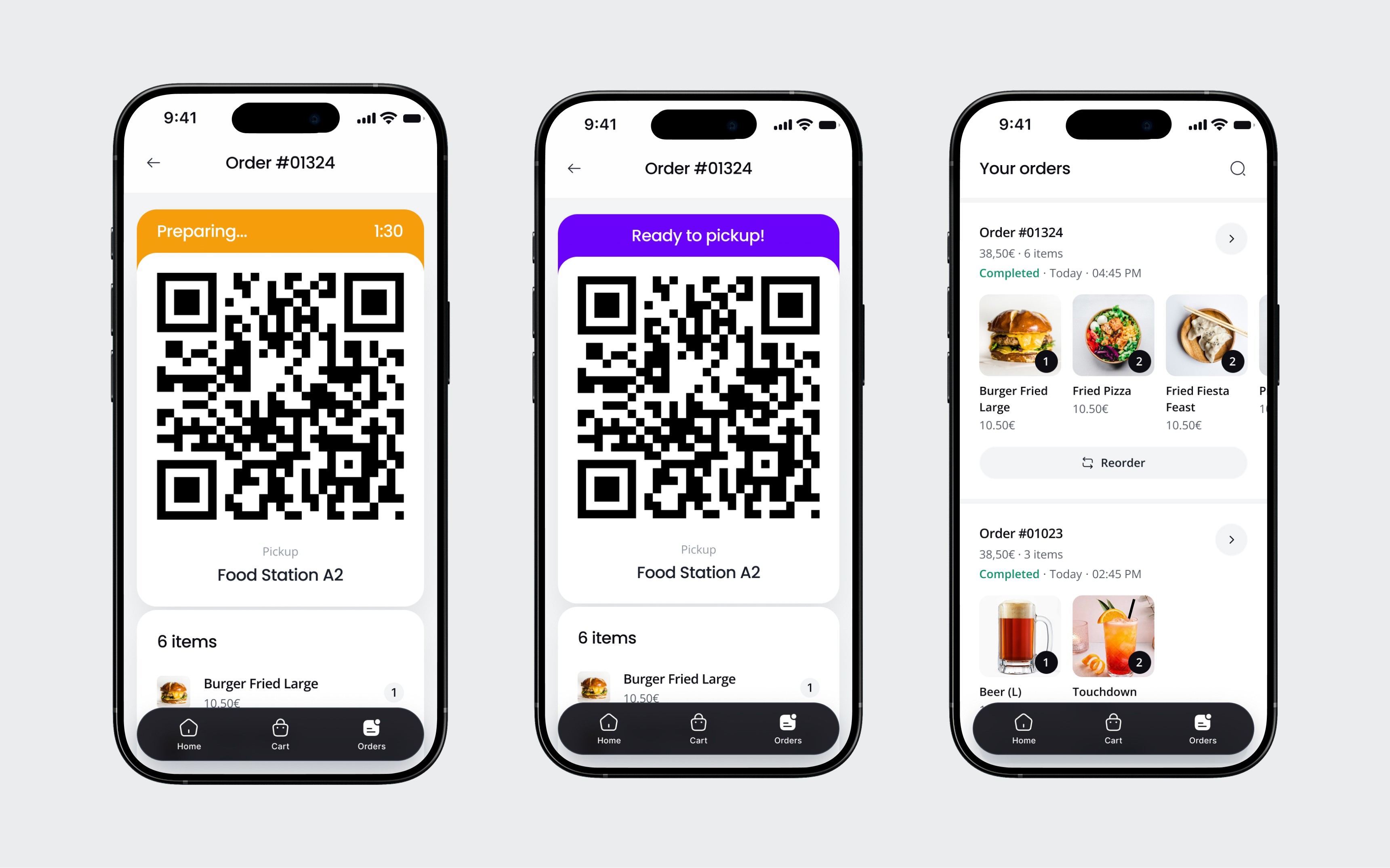
Order status and QR
After payment, the guest sees their QR code with a live status and a countdown timer. This is the screen they'll stare at while walking to the pickup point. It needed to be glanceable: big and clear status label, big QR code, and pickup station name. Nothing else.

A guest ordering via Eventbro at Fairground Festival, 2024.
03
The system
The bartender experience
The bartender app needed to work in the opposite conditions. Where the guest needs simplicity, the bartender needs visibility and control.
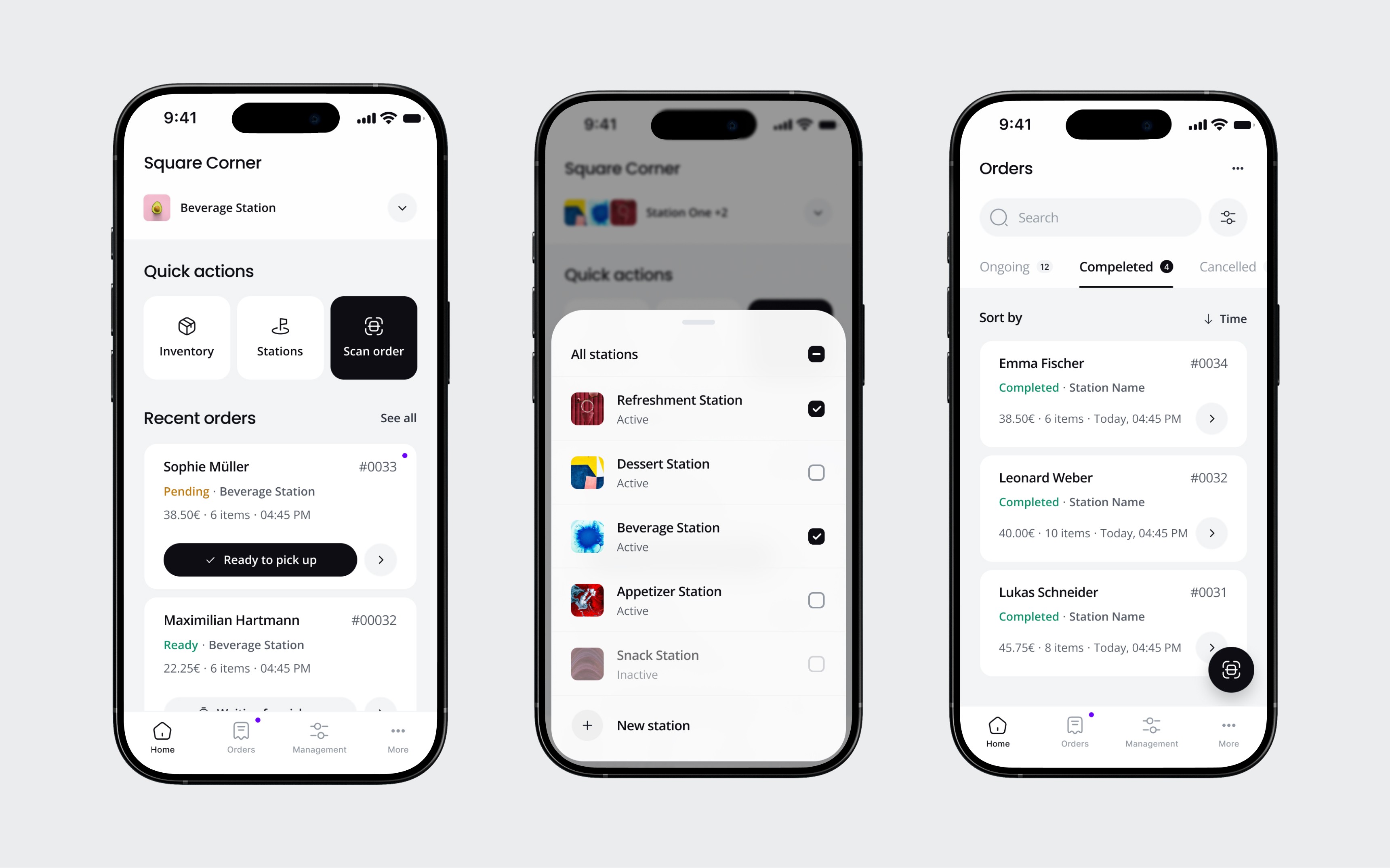
Home and order management
The home screen shows recent orders with the most important action front and center: "Ready to pick up." Bartenders can update an order's status without opening the detail view. "Scan order" is the biggest quick action button because that's what happens most frequently at the pickup counter. The app also supports multiple stations, so a single provider can manage food and drink bars separately or together.

Order details and states
Each order moves through six states: pending, preparing, ready, completed, cancelled, and refunded. The detail screen handles all of them, including partial item redemption for when a customer picks up some items but not all. Refunds can be full or partial, and cancellations give the bartender options to refund or keep the order active. This complexity had to be accessible without being overwhelming, so I used clear color coding and progressive disclosure. The primary actions are always visible. Edge cases live behind a tap.
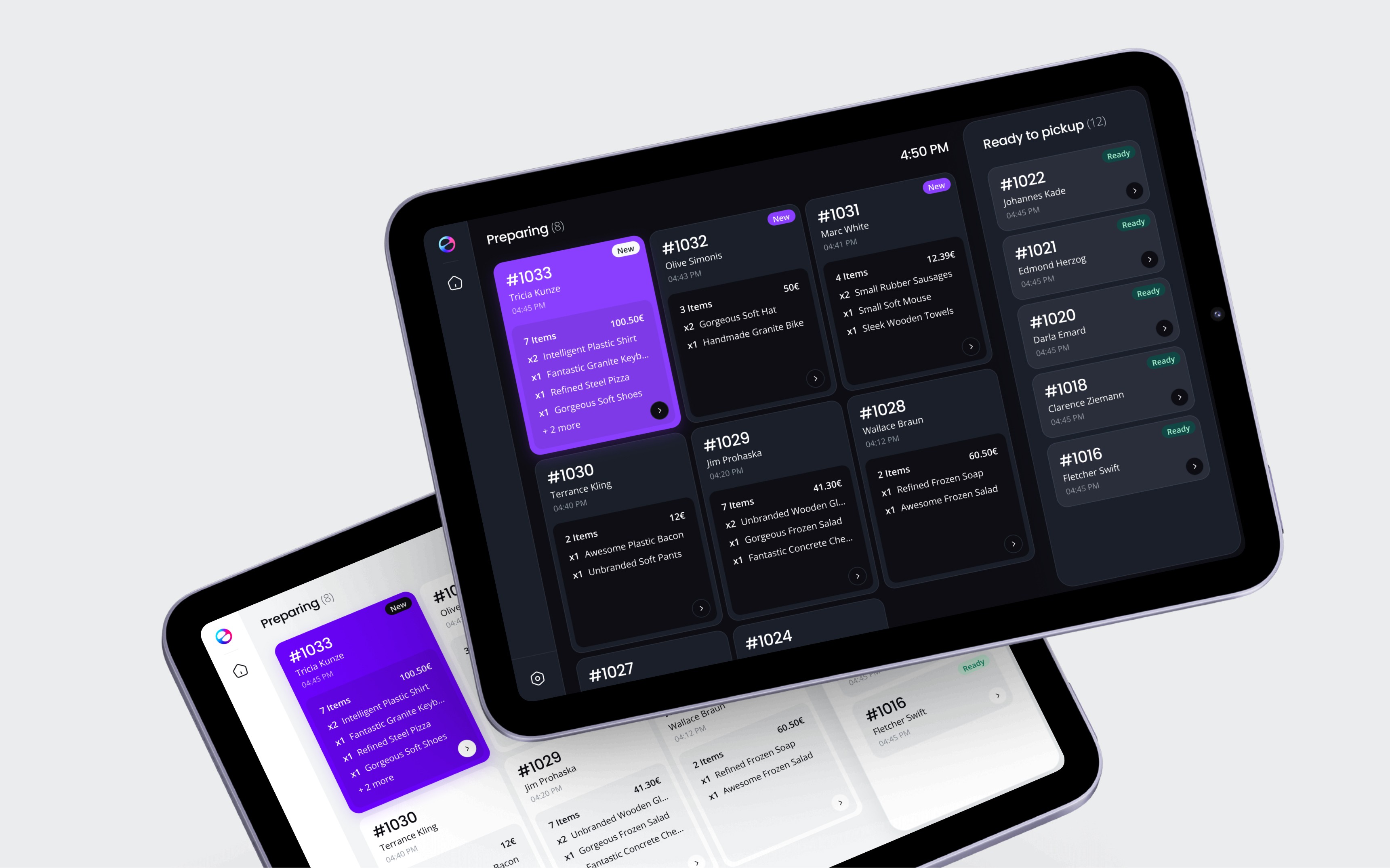
The tablet dashboard for passive monitoring. Preparing orders on the left, ready for pickup on the right.
03
The system
The tablet dashboard
The tablet sits behind the bar and shows all active orders at a glance. "Preparing" cards in a grid on the left, "Ready to pickup" list on the right. Bartenders don't touch this screen. They glance at it from a distance to track how many orders are in the queue. All interactions happen on their phone. The tablet is for awareness, the phone is for action.
04
The environment
Designing for chaos
Eventbro is a web app. No download, no account, no onboarding. A guest scans a QR code and they're in. That means every design decision had to assume this was the first and only time someone would see this interface.
Now put that person in a festival. It's loud. It's dark, or it's blinding sunlight. They're standing, not sitting. They might be three drinks in. Their friends are pulling them toward the stage. They want a drink, not an app experience.
That context shaped everything.
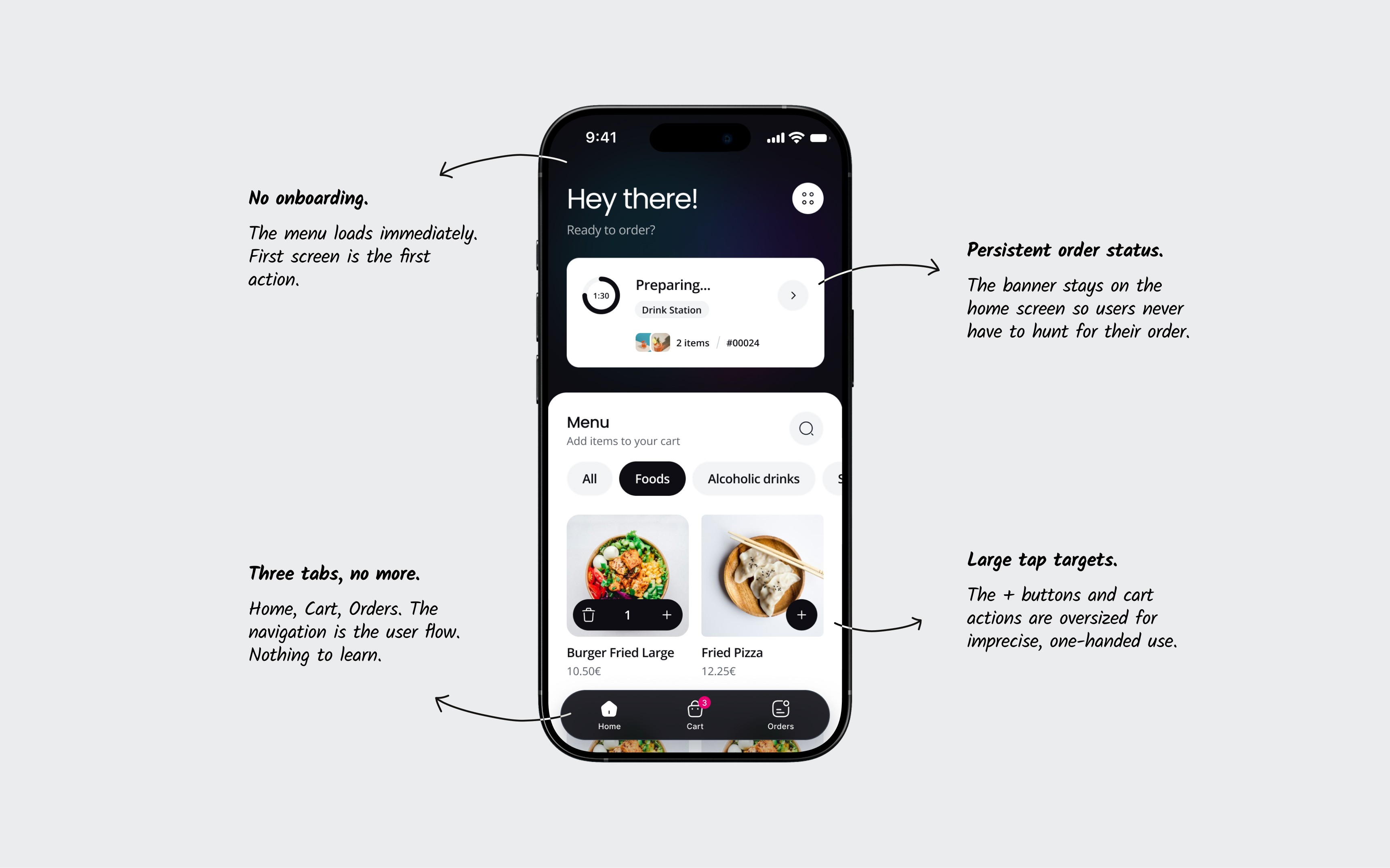

On the bartender side, the same principle applied in reverse. The bartender is moving fast, their hands are busy, and they can't stop to study a screen. So the most frequent action, marking an order as ready, is a single tap directly on the order card. No need to open a detail view for the most common task.
The tablet dashboard takes this even further. It's designed to be read from a distance. Large order numbers, clear column separation between "Preparing" and "Ready to pickup," high contrast on a dark background. Bartenders glance at it the way a cook glances at a ticket rail. No interaction needed.
05
The friction
The cup problem
The ordering flow worked. But at Fairground, one part of the system created friction we didn't fully anticipate: the cup refund process.
Every drink came in a reusable cup with a deposit. When a guest returned the cup to a recycling machine, they got their deposit back automatically. Simple enough on the guest side. But behind the bar, the process was different.
Each cup had a unique ID. Before handing over an order, the bartender had to place the cups on a scanner plate that assigned each cup to that specific order. This was required by our cup provider, Tomra. We didn't design this step. We integrated it into our flow because the partnership required it.
In testing, it seemed manageable. At the festival, during a rush, it slowed bartenders down. Scanning cups mid-flow broke their rhythm. Errors happened. Sometimes the scan didn't register and they had to redo it. A process that added ten seconds per order in testing added thirty in reality.
We identified this as the biggest UX problem to solve in the next version. Two directions we scoped before the project paused:
01
Shift responsibility to the guest.
Let customers handle cup validation through the app instead of adding steps to the bartender's workflow.
02
Reduce scan friction.
If the manual step had to stay, improve the UI to make scanning faster and more forgiving of errors.
The project went on hold after Fairground, so none of these shipped. But naming the problem and scoping the fix is part of the work.
06
The launch
Fairground 2024
Eventbro launched at the Fairground Festival in Hannover, November 2024. One bar, one evening, roughly 500 orders.
06
The launch
We placed QR codes across the venue. Guests scanned, ordered, and paid from their phones. Bartenders managed the flow from behind the bar. The full loop we designed played out in real time.
Shorter wait times
Compared to traditional bar ordering
Positive feedback
From ~50 guests surveyed on-site at the festival
Scan to order
Average duration from QR scan to checkout and placing order
Wait times dropped by 30% compared to traditional bar ordering. The average guest went from scanning the QR code to completing an order in under 60 seconds. And in a quick survey of about 50 guests at the event, 90% said they preferred the app over walking to the bar.
These are real numbers from a single event. The sample is small, and the context was controlled. But for an MVP tested part-time in three months, the signal was clear: the core experience worked.
07
Close
Eventbro was three months of making fast decisions with incomplete information. Some of them were right. The cup refund flow wasn't. But the product worked on its first real test, and the things that didn't work gave us a clear list of what to fix next.
If I had more time, I'd have tested the bartender flow with actual bar staff before launch, not just our engineering team pretending to make drinks in the office. That's the gap I'd close first.
Eventbro ran again at Fairground 2025. The system I designed in three months became the foundation for a product that's still live.
Eventbro
Eventbro
I designed a two-sided ordering system so festival guests stop waiting, and bartenders can actually keep up.
I designed a two-sided ordering system so festival guests stop waiting, and bartenders can actually keep up.
Shorter wait times
Shorter wait times
Shorter wait times
Positive feedback
Positive feedback
Positive feedback
Order to checkout
Order to checkout
Order to checkout
Info
Role
Sole Product Designer
Platforms
Web app, iOS/Android, Tablet
Timeline
3 months, part-time (2024)
Team
1 Designer, 2 Engineers, CPO
Website
01
Background
What I walked into
Ticketbro is a B2B booking platform and in 2024, the team wanted to expand into on-site ordering for festivals and events. The idea was straightforward: let guests order food and drinks from their phones instead of standing in line.
Mobile ordering at events wasn't new. But Ticketbro needed something that worked within their ecosystem, could launch fast, and was built specifically for the chaos of live events.
I was the only designer on the project. My scope covered everything: branding, product design for the guest-facing web app, a separate app for bartenders and staff, and a tablet dashboard for monitoring orders behind the bar. All of it needed to be ready for a real festival in three months, and this was a part-time engagement alongside my other work at Ticketbro
First session with the CPO. We mapped the two-sided system on paper before anything went into Figma.
The timeline didn't leave room for deep upfront research. So I talked to a handful of regular festival-goers and a bartender to validate the core pain points quickly. Three things came back clearly:
01
Guests hated waiting
Average wait: 6 to 25 minutes for a single drink.
02
Overwhelmed bartenders
Juggling orders, payments, and refunds at once.
03
Refund confusion
Handing cups back to bartenders for a refund slowed the line and created arguments.
With that, the team ran a short workshop to align on priorities and scope. Then I started designing.
I created the Eventbro logo, brand identity, and website in parallel with the product work.
02
The problem
Two users, one system
How do you build one product that works for someone ordering a drink in a loud crowd and someone making that drink behind a bar?
The guest and the bartender need completely different things from the same system.
For
The guest
At a festival, on their phone, probably standing in sunlight or in the dark. Impatient, possibly a few drinks in. They've never seen this app before and won't read instructions. Everything needs to work on the first tap.
For
The guest
At a festival, on their phone, probably standing in sunlight or in the dark. Impatient, possibly a few drinks in. They've never seen this app before and won't read instructions. Everything needs to work on the first tap.
For
The bartender
Behind a bar during a rush. Hands are wet, orders are piling up, someone is yelling. They need to see what's coming, mark what's ready, and confirm pickups without slowing down. Detail matters, but so does speed.
These two users share one system but almost nothing else. The guest wants fewer steps. The bartender wants more control. The guest interacts once and leaves. The bartender lives in the app for hours.
Designing for one without breaking the other was the core tension of the entire project.
03
The system
The guest experience
I structured the guest app around three tabs: Home (the menu), Cart, and Orders. No settings, no profile, no onboarding. The navigation is the user flow.
Home and menu
The home screen is the menu. No splash screen, no welcome flow. The guest lands and immediately sees what they can order. When an active order exists, a persistent status banner sits on top so the guest always knows where their order is without leaving the menu. This matters because people order more than once at a festival. The menu stays accessible even while they're waiting for a previous order.
Cart and checkout
The cart is minimal: items, quantities, total, one button. Checkout asks for name, email, and phone, then goes straight to Apple Pay or Google Pay. No account creation. At a festival, every extra field is a reason to give up and walk to the bar instead.
Order status and QR
After payment, the guest sees their QR code with a live status and a countdown timer. This is the screen they'll stare at while walking to the pickup point. It needed to be glanceable: big and clear status label, big QR code, and pickup station name. Nothing else.
A guest ordering via Eventbro at Fairground Festival, 2024.
03
The system
The bartender experience
The bartender app needed to work in the opposite conditions. Where the guest needs simplicity, the bartender needs visibility and control.
Home and order management
The home screen shows recent orders with the most important action front and center: "Ready to pick up." Bartenders can update an order's status without opening the detail view. "Scan order" is the biggest quick action button because that's what happens most frequently at the pickup counter. The app also supports multiple stations, so a single provider can manage food and drink bars separately or together.
Order details and states
Each order moves through six states: pending, preparing, ready, completed, cancelled, and refunded. The detail screen handles all of them, including partial item redemption for when a customer picks up some items but not all. Refunds can be full or partial, and cancellations give the bartender options to refund or keep the order active. This complexity had to be accessible without being overwhelming, so I used clear color coding and progressive disclosure. The primary actions are always visible. Edge cases live behind a tap.
The tablet dashboard for passive monitoring. Preparing orders on the left, ready for pickup on the right.
03
The system
The tablet dashboard
The tablet sits behind the bar and shows all active orders at a glance. "Preparing" cards in a grid on the left, "Ready to pickup" list on the right. Bartenders don't touch this screen. They glance at it from a distance to track how many orders are in the queue. All interactions happen on their phone. The tablet is for awareness, the phone is for action.
04
The environment
Designing for chaos
Eventbro is a web app. No download, no account, no onboarding. A guest scans a QR code and they're in. That means every design decision had to assume this was the first and only time someone would see this interface.
Now put that person in a festival. It's loud. It's dark, or it's blinding sunlight. They're standing, not sitting. They might be three drinks in. Their friends are pulling them toward the stage. They want a drink, not an app experience.
That context shaped everything.
On the bartender side, the same principle applied in reverse. The bartender is moving fast, their hands are busy, and they can't stop to study a screen. So the most frequent action, marking an order as ready, is a single tap directly on the order card. No need to open a detail view for the most common task.
The tablet dashboard takes this even further. It's designed to be read from a distance. Large order numbers, clear column separation between "Preparing" and "Ready to pickup," high contrast on a dark background. Bartenders glance at it the way a cook glances at a ticket rail. No interaction needed.
05
The friction
The cup problem
The ordering flow worked. But at Fairground, one part of the system created friction we didn't fully anticipate: the cup refund process.
Every drink came in a reusable cup with a deposit. When a guest returned the cup to a recycling machine, they got their deposit back automatically. Simple enough on the guest side. But behind the bar, the process was different.
Each cup had a unique ID. Before handing over an order, the bartender had to place the cups on a scanner plate that assigned each cup to that specific order. This was required by our cup provider, Tomra. We didn't design this step. We integrated it into our flow because the partnership required it.
In testing, it seemed manageable. At the festival, during a rush, it slowed bartenders down. Scanning cups mid-flow broke their rhythm. Errors happened. Sometimes the scan didn't register and they had to redo it. A process that added ten seconds per order in testing added thirty in reality.
We identified this as the biggest UX problem to solve in the next version. Two directions we scoped before the project paused:
01
Shift responsibility to the guest.
Let customers handle cup validation through the app instead of adding steps to the bartender's workflow.
02
Reduce scan friction.
If the manual step had to stay, improve the UI to make scanning faster and more forgiving of errors.
The project went on hold after Fairground, so none of these shipped. But naming the problem and scoping the fix is part of the work.
06
The launch
Fairground 2024
Eventbro launched at the Fairground Festival in Hannover, November 2024. One bar, one evening, roughly 500 orders.
06
The launch
We placed QR codes across the venue. Guests scanned, ordered, and paid from their phones. Bartenders managed the flow from behind the bar. The full loop we designed played out in real time.
Shorter wait times
Compared to traditional bar ordering
Positive feedback
From ~50 guests surveyed on-site at the festival
Scan to order
Average duration from QR scan to checkout and placing order
Wait times dropped by 30% compared to traditional bar ordering. The average guest went from scanning the QR code to completing an order in under 60 seconds. And in a quick survey of about 50 guests at the event, 90% said they preferred the app over walking to the bar.
These are real numbers from a single event. The sample is small, and the context was controlled. But for an MVP tested part-time in three months, the signal was clear: the core experience worked.
07
Close
Eventbro was three months of making fast decisions with incomplete information. Some of them were right. The cup refund flow wasn't. But the product worked on its first real test, and the things that didn't work gave us a clear list of what to fix next.
If I had more time, I'd have tested the bartender flow with actual bar staff before launch, not just our engineering team pretending to make drinks in the office. That's the gap I'd close first.
Eventbro ran again at Fairground 2025. The system I designed in three months became the foundation for a product that's still live.
Eventbro
Eventbro
I designed a two-sided ordering system so festival guests stop waiting, and bartenders can actually keep up.
I designed a two-sided ordering system so festival guests stop waiting, and bartenders can actually keep up.
Shorter wait times
Shorter wait times
Shorter wait times
Positive feedback
Positive feedback
Positive feedback
Order to checkout
Order to checkout
Order to checkout
Info
Role
Sole Product Designer
Platforms
Web app, iOS/Android, Tablet
Timeline
3 months, part-time (2024)
Team
1 Designer, 2 Engineers, CPO
Website
01
Background
What I walked into
Ticketbro is a B2B booking platform and in 2024, the team wanted to expand into on-site ordering for festivals and events. The idea was straightforward: let guests order food and drinks from their phones instead of standing in line.
Mobile ordering at events wasn't new. But Ticketbro needed something that worked within their ecosystem, could launch fast, and was built specifically for the chaos of live events.
I was the only designer on the project. My scope covered everything: branding, product design for the guest-facing web app, a separate app for bartenders and staff, and a tablet dashboard for monitoring orders behind the bar. All of it needed to be ready for a real festival in three months, and this was a part-time engagement alongside my other work at Ticketbro
First session with the CPO. We mapped the two-sided system on paper before anything went into Figma.
The timeline didn't leave room for deep upfront research. So I talked to a handful of regular festival-goers and a bartender to validate the core pain points quickly. Three things came back clearly:
01
Guests hated waiting
Average wait: 6 to 25 minutes for a single drink.
02
Overwhelmed bartenders
Juggling orders, payments, and refunds at once.
03
Refund confusion
Handing cups back to bartenders for a refund slowed the line and created arguments.
With that, the team ran a short workshop to align on priorities and scope. Then I started designing.
I created the Eventbro logo, brand identity, and website in parallel with the product work.
02
The problem
Two users, one system
How do you build one product that works for someone ordering a drink in a loud crowd and someone making that drink behind a bar?
The guest and the bartender need completely different things from the same system.
For
The guest
At a festival, on their phone, probably standing in sunlight or in the dark. Impatient, possibly a few drinks in. They've never seen this app before and won't read instructions. Everything needs to work on the first tap.
For
The guest
At a festival, on their phone, probably standing in sunlight or in the dark. Impatient, possibly a few drinks in. They've never seen this app before and won't read instructions. Everything needs to work on the first tap.
For
The bartender
Behind a bar during a rush. Hands are wet, orders are piling up, someone is yelling. They need to see what's coming, mark what's ready, and confirm pickups without slowing down. Detail matters, but so does speed.
These two users share one system but almost nothing else. The guest wants fewer steps. The bartender wants more control. The guest interacts once and leaves. The bartender lives in the app for hours.
Designing for one without breaking the other was the core tension of the entire project.
03
The system
The guest experience
I structured the guest app around three tabs: Home (the menu), Cart, and Orders. No settings, no profile, no onboarding. The navigation is the user flow.
Home and menu
The home screen is the menu. No splash screen, no welcome flow. The guest lands and immediately sees what they can order. When an active order exists, a persistent status banner sits on top so the guest always knows where their order is without leaving the menu. This matters because people order more than once at a festival. The menu stays accessible even while they're waiting for a previous order.
Cart and checkout
The cart is minimal: items, quantities, total, one button. Checkout asks for name, email, and phone, then goes straight to Apple Pay or Google Pay. No account creation. At a festival, every extra field is a reason to give up and walk to the bar instead.
Order status and QR
After payment, the guest sees their QR code with a live status and a countdown timer. This is the screen they'll stare at while walking to the pickup point. It needed to be glanceable: big and clear status label, big QR code, and pickup station name. Nothing else.
A guest ordering via Eventbro at Fairground Festival, 2024.
03
The system
The bartender experience
The bartender app needed to work in the opposite conditions. Where the guest needs simplicity, the bartender needs visibility and control.
Home and order management
The home screen shows recent orders with the most important action front and center: "Ready to pick up." Bartenders can update an order's status without opening the detail view. "Scan order" is the biggest quick action button because that's what happens most frequently at the pickup counter. The app also supports multiple stations, so a single provider can manage food and drink bars separately or together.
Order details and states
Each order moves through six states: pending, preparing, ready, completed, cancelled, and refunded. The detail screen handles all of them, including partial item redemption for when a customer picks up some items but not all. Refunds can be full or partial, and cancellations give the bartender options to refund or keep the order active. This complexity had to be accessible without being overwhelming, so I used clear color coding and progressive disclosure. The primary actions are always visible. Edge cases live behind a tap.
The tablet dashboard for passive monitoring. Preparing orders on the left, ready for pickup on the right.
03
The system
The tablet dashboard
The tablet sits behind the bar and shows all active orders at a glance. "Preparing" cards in a grid on the left, "Ready to pickup" list on the right. Bartenders don't touch this screen. They glance at it from a distance to track how many orders are in the queue. All interactions happen on their phone. The tablet is for awareness, the phone is for action.
04
The environment
Designing for chaos
Eventbro is a web app. No download, no account, no onboarding. A guest scans a QR code and they're in. That means every design decision had to assume this was the first and only time someone would see this interface.
Now put that person in a festival. It's loud. It's dark, or it's blinding sunlight. They're standing, not sitting. They might be three drinks in. Their friends are pulling them toward the stage. They want a drink, not an app experience.
That context shaped everything.
On the bartender side, the same principle applied in reverse. The bartender is moving fast, their hands are busy, and they can't stop to study a screen. So the most frequent action, marking an order as ready, is a single tap directly on the order card. No need to open a detail view for the most common task.
The tablet dashboard takes this even further. It's designed to be read from a distance. Large order numbers, clear column separation between "Preparing" and "Ready to pickup," high contrast on a dark background. Bartenders glance at it the way a cook glances at a ticket rail. No interaction needed.
05
The friction
The cup problem
The ordering flow worked. But at Fairground, one part of the system created friction we didn't fully anticipate: the cup refund process.
Every drink came in a reusable cup with a deposit. When a guest returned the cup to a recycling machine, they got their deposit back automatically. Simple enough on the guest side. But behind the bar, the process was different.
Each cup had a unique ID. Before handing over an order, the bartender had to place the cups on a scanner plate that assigned each cup to that specific order. This was required by our cup provider, Tomra. We didn't design this step. We integrated it into our flow because the partnership required it.
In testing, it seemed manageable. At the festival, during a rush, it slowed bartenders down. Scanning cups mid-flow broke their rhythm. Errors happened. Sometimes the scan didn't register and they had to redo it. A process that added ten seconds per order in testing added thirty in reality.
We identified this as the biggest UX problem to solve in the next version. Two directions we scoped before the project paused:
01
Shift responsibility to the guest.
Let customers handle cup validation through the app instead of adding steps to the bartender's workflow.
02
Reduce scan friction.
If the manual step had to stay, improve the UI to make scanning faster and more forgiving of errors.
The project went on hold after Fairground, so none of these shipped. But naming the problem and scoping the fix is part of the work.
06
The launch
Fairground 2024
Eventbro launched at the Fairground Festival in Hannover, November 2024. One bar, one evening, roughly 500 orders.
06
The launch
We placed QR codes across the venue. Guests scanned, ordered, and paid from their phones. Bartenders managed the flow from behind the bar. The full loop we designed played out in real time.
Shorter wait times
Compared to traditional bar ordering
Positive feedback
From ~50 guests surveyed on-site at the festival
Scan to order
Average duration from QR scan to checkout and placing order
Wait times dropped by 30% compared to traditional bar ordering. The average guest went from scanning the QR code to completing an order in under 60 seconds. And in a quick survey of about 50 guests at the event, 90% said they preferred the app over walking to the bar.
These are real numbers from a single event. The sample is small, and the context was controlled. But for an MVP tested part-time in three months, the signal was clear: the core experience worked.
07
Close
Eventbro was three months of making fast decisions with incomplete information. Some of them were right. The cup refund flow wasn't. But the product worked on its first real test, and the things that didn't work gave us a clear list of what to fix next.
If I had more time, I'd have tested the bartender flow with actual bar staff before launch, not just our engineering team pretending to make drinks in the office. That's the gap I'd close first.
Eventbro ran again at Fairground 2025. The system I designed in three months became the foundation for a product that's still live.