Self-Checkout Terminal
Self-Checkout Terminal
I designed a kiosk so simple that nobody at the venue needs to explain it.
I designed a kiosk so simple that nobody at the venue needs to explain it.
Saved per transaction
Saved per transaction
Saved per transaction
More on-site sales
More on-site sales
More on-site sales
Venues
Venues
Venues

Info
Role
Sole Product Designer
Platforms
Kiosk / POS (32" touchscreen)
Timeline
~2 months, part-time (2023)
Team
1 Designer, 1 Engineers, PO
Website
01
Background
Why a kiosk
Most of Ticketbro's customers are physical venues: indoor playgrounds, escape rooms, adventure parks. Guests buy tickets online, but plenty still show up without one. At the door, they wait in line while staff manually process walk-in purchases.
The line is the problem. For guests, it's wasted time. For staff, it's repetitive work that pulls them away from the actual visitor experience. For the venue, it's a bottleneck that costs money during peak hours.
The idea: a self-checkout terminal at the entrance. Guests walk up, select their tickets, tap to pay, and get a printed ticket on the spot. No staff interaction needed for a standard purchase.
The terminal runs on a 32” touchscreen with an integrated card reader and thermal printer, all connected to Ticketbro’s existing booking system. Venue operators manage products, schedules, and booking logic through the same platform they already use for online sales, so the kiosk had to stay tightly aligned with that system. The goal was not to copy the online checkout screen by screen, but to keep the logic and flow consistent enough that it felt like part of the same product.
I designed the full checkout experience: from the attract screen that pulls someone in, through every step of the purchase, to the moment the ticket prints.
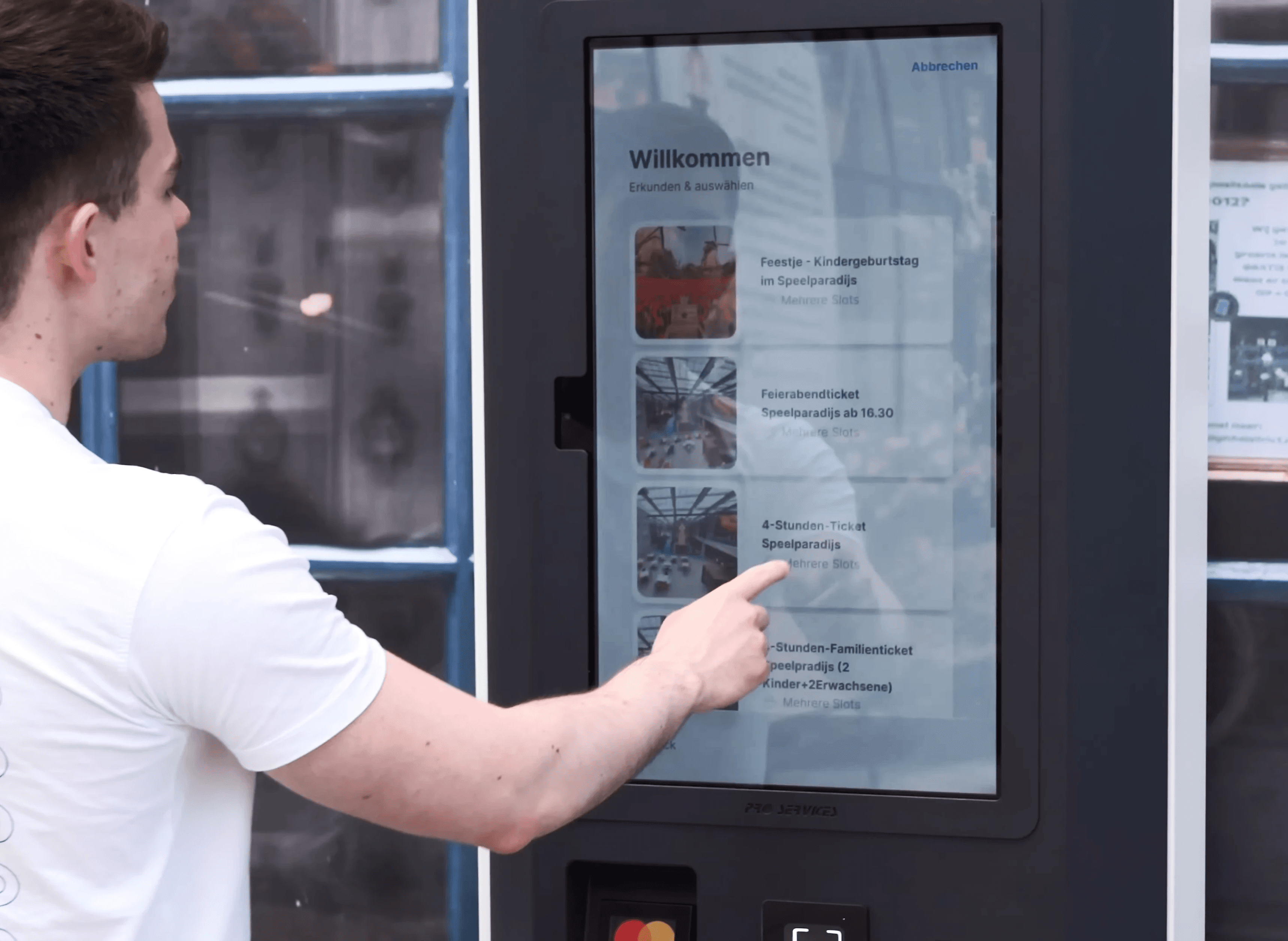
First deployment at HollandPark, Berlin.
02
The challenge
Designing for everyone
How do you make a six-step booking flow feel obvious on first tap?
A kiosk in a venue lobby isn’t like a phone in someone’s hand. There’s no onboarding. No tutorial. No second session where the user already knows the flow. Every interaction is a first-time interaction.
The user could be a parent with a toddler pulling at their arm, a tourist who doesn’t speak German, or someone who’s never used a self-checkout and isn’t sure they trust it. If the first screen confuses them, they walk to the counter. The kiosk has failed.
The purchase flow has real complexity behind it: product selection, date, time slot, visitor types, optional add-ons, customization, and payment. Removing steps wasn’t an option. The venues needed that flexibility, and the kiosk had to stay aligned with the same booking logic used in Ticketbro’s platform.
So the challenge was not just simplifying screens. It was reducing how much each screen asked the user to process at once, making the next action obvious, and shaping the flow around patterns people already knew. Even though kiosks have their own constraints, people used it more easily when the interaction felt closer to the mobile apps they were already familiar with.
03
The MVP
Ship and learn
I designed the MVP focused on getting the core purchase flow working: select a product, choose a time slot, pick visitor types, and pay. We shipped it to HollandPark in Berlin.
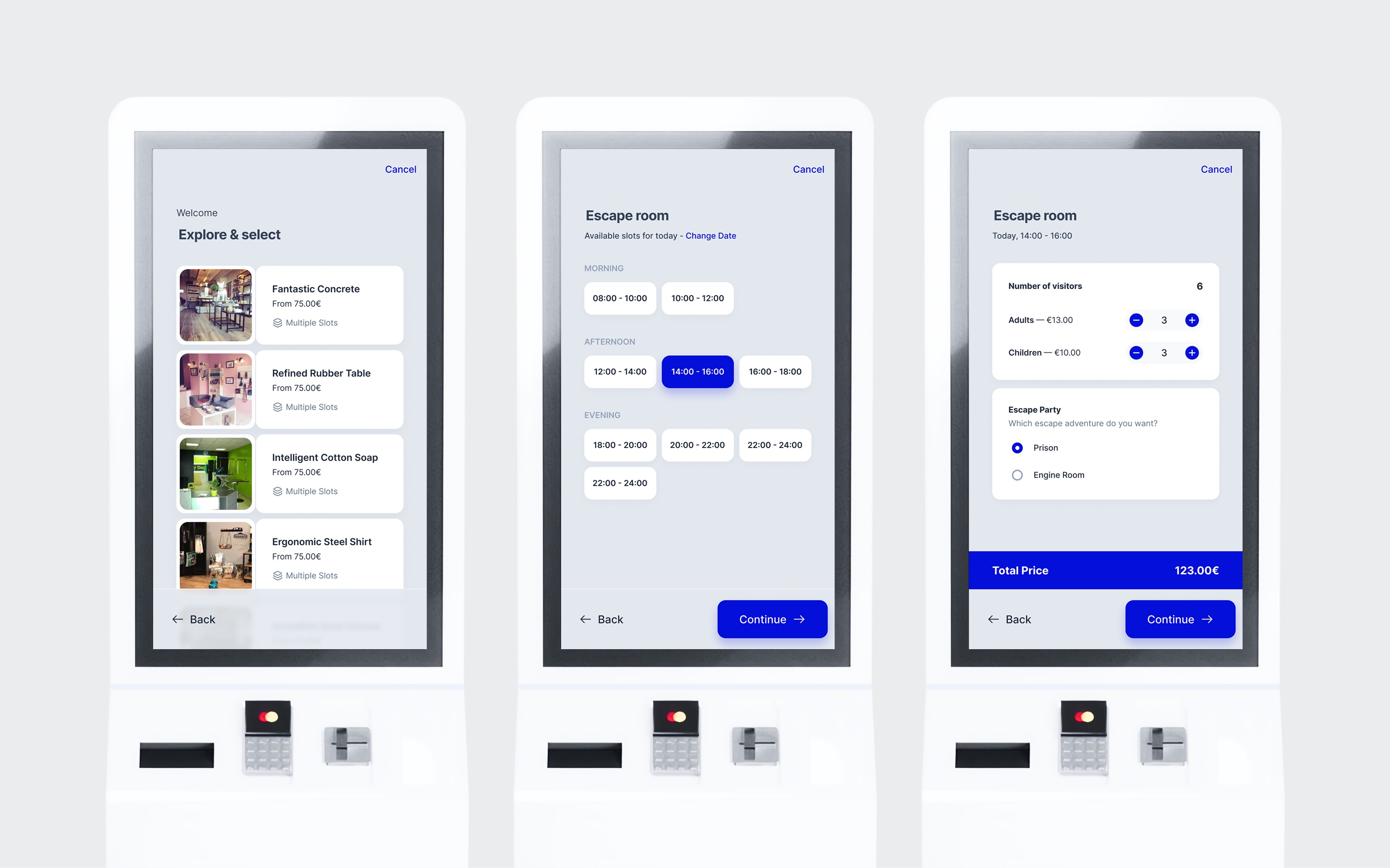
Then we watched. We ran unmoderated observation sessions with about 10 visitors at the venue. No tasks, no instructions. Just people walking up to the kiosk and trying to buy a ticket. We noted where they paused, tapped the wrong thing, or looked around for help. The venue staff shared what they were hearing from guests, too.
Three patterns stood out:
01
Too many choices at once
Several steps asked users to process multiple decisions at the same time. Even when the options were technically clear, the amount of visible choice made the flow feel harder than it needed to.
02
Unclear next action
On key screens, users weren’t always sure where to tap first or what to do next. Too many elements competed for attention, so the flow didn’t guide them strongly enough.
03
Low interaction confidence
Users often weren’t fully sure whether the system had registered their selection or payment. Some tapped again. Others paused and looked around for reassurance.
04
The iteration
What changed and why
Every change in the second version came directly from what we observed. The redesign focused on reducing visible complexity, making the next action clearer on every screen, and using more familiar interaction patterns throughout the flow.
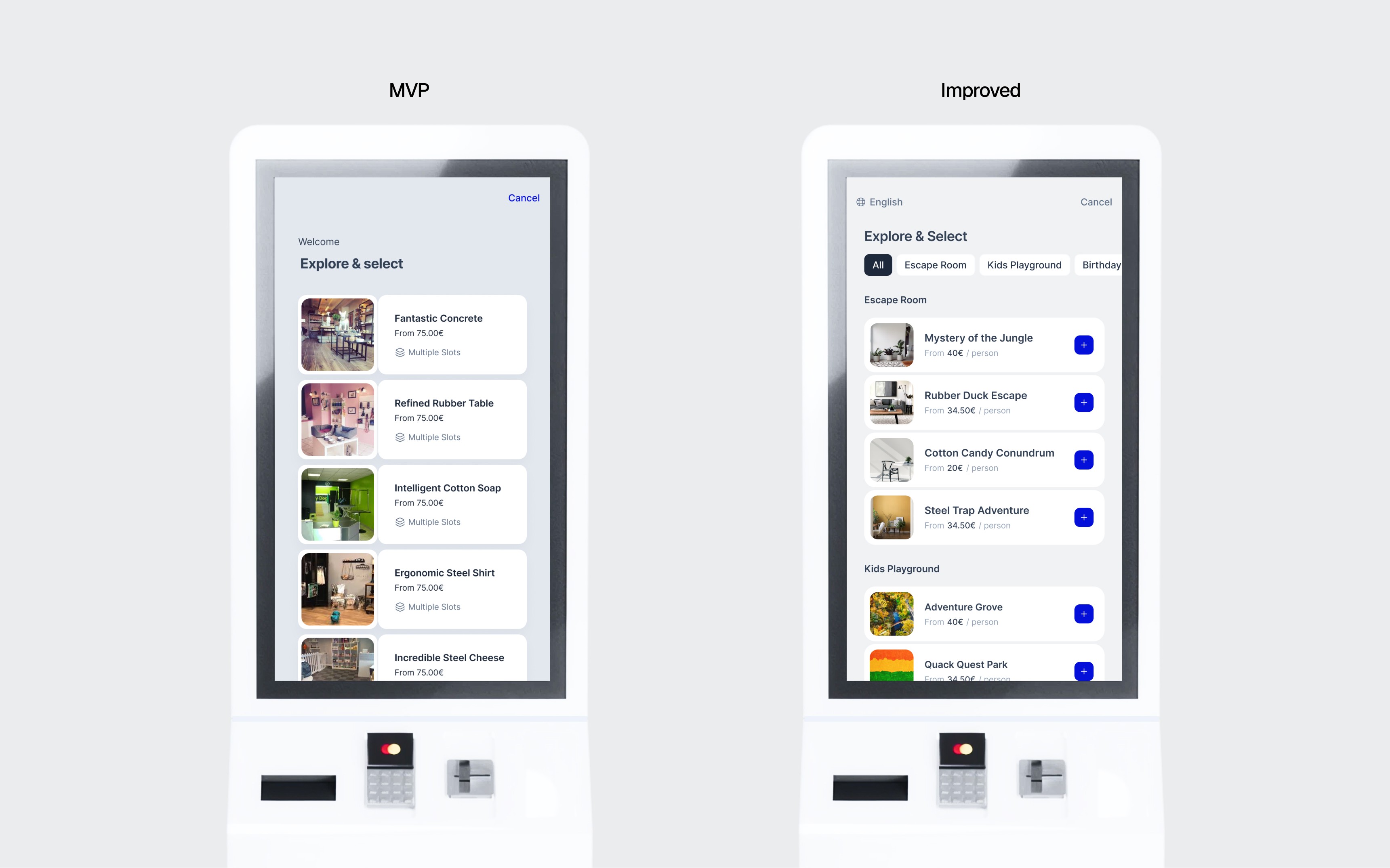
Product selection
The first version showed a flat list of every product with large image cards. Users had to scroll through everything to find their ticket.
I added category tabs at the top and switched to a compact list layout with clear add buttons. Products are grouped by type, and the layout shows more options per screen. The structure feels more familiar, the next action is clearer, and users find what they need with less hesitation.

Time slot selection
The original used a 3-column grid grouped by morning, afternoon, and evening. It looked clean but forced users to scan in a Z-pattern. In testing, people misselected slots or stalled trying to figure out the layout.
I changed it to a single-column list. The current time slot is pre-selected and highlighted with a "Now" tag. Most kiosk users are buying for right now, not next Thursday. The default being correct means most people just confirm and move on.
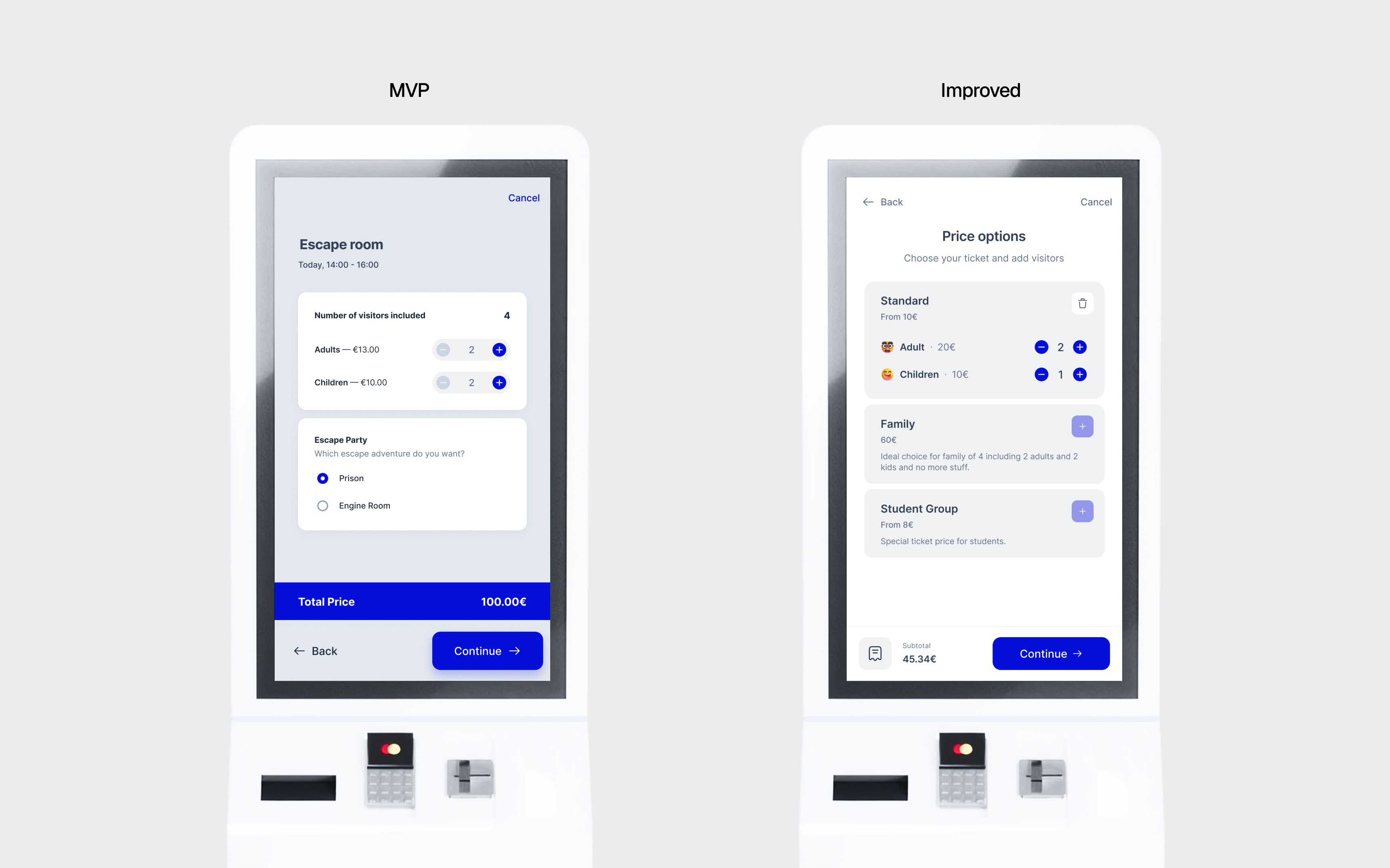
Pricing and visitors
The first version put visitor counts and customization options on the same screen. Too many decisions at once. Users hesitated over which section to interact with first.
I split this into two screens. The pricing screen handles ticket types and visitor counts only. Customization got its own dedicated step. Each screen has one job. I also introduced multiple price variations defined by venues for more flexibility and users clearer options.

Customization
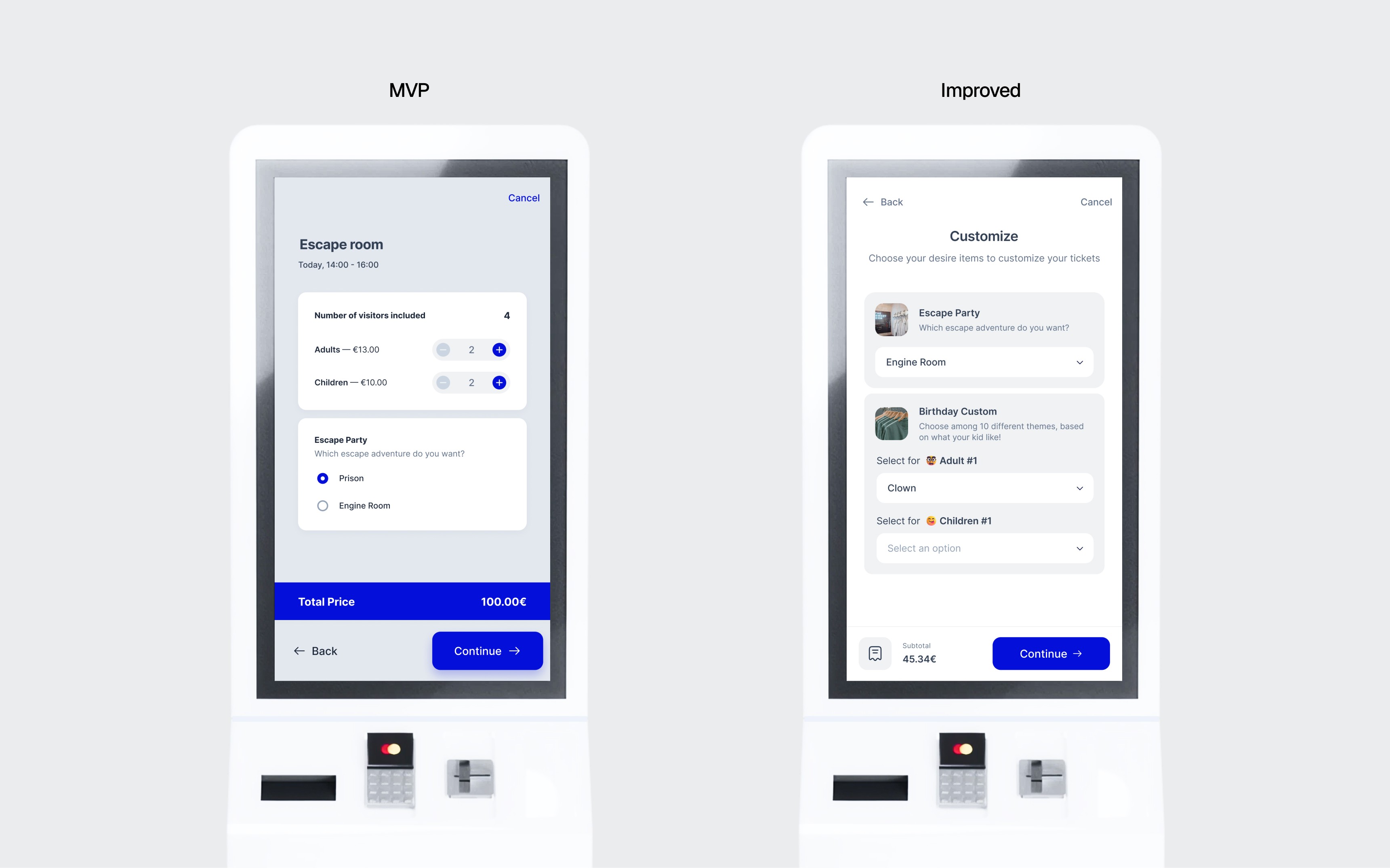
The MVP used inline radio buttons for customization, mixed in with the pricing screen. As the number of options grew across different venues, this became cluttered and confusing.
I moved customization to a dedicated screen with structured cards. Each option has a clear label and description. For venues with many variations, dropdown selectors replaced radio buttons. Customization options are now tied to individual visitors, so a family can make different selections for each person.
Cart and payment
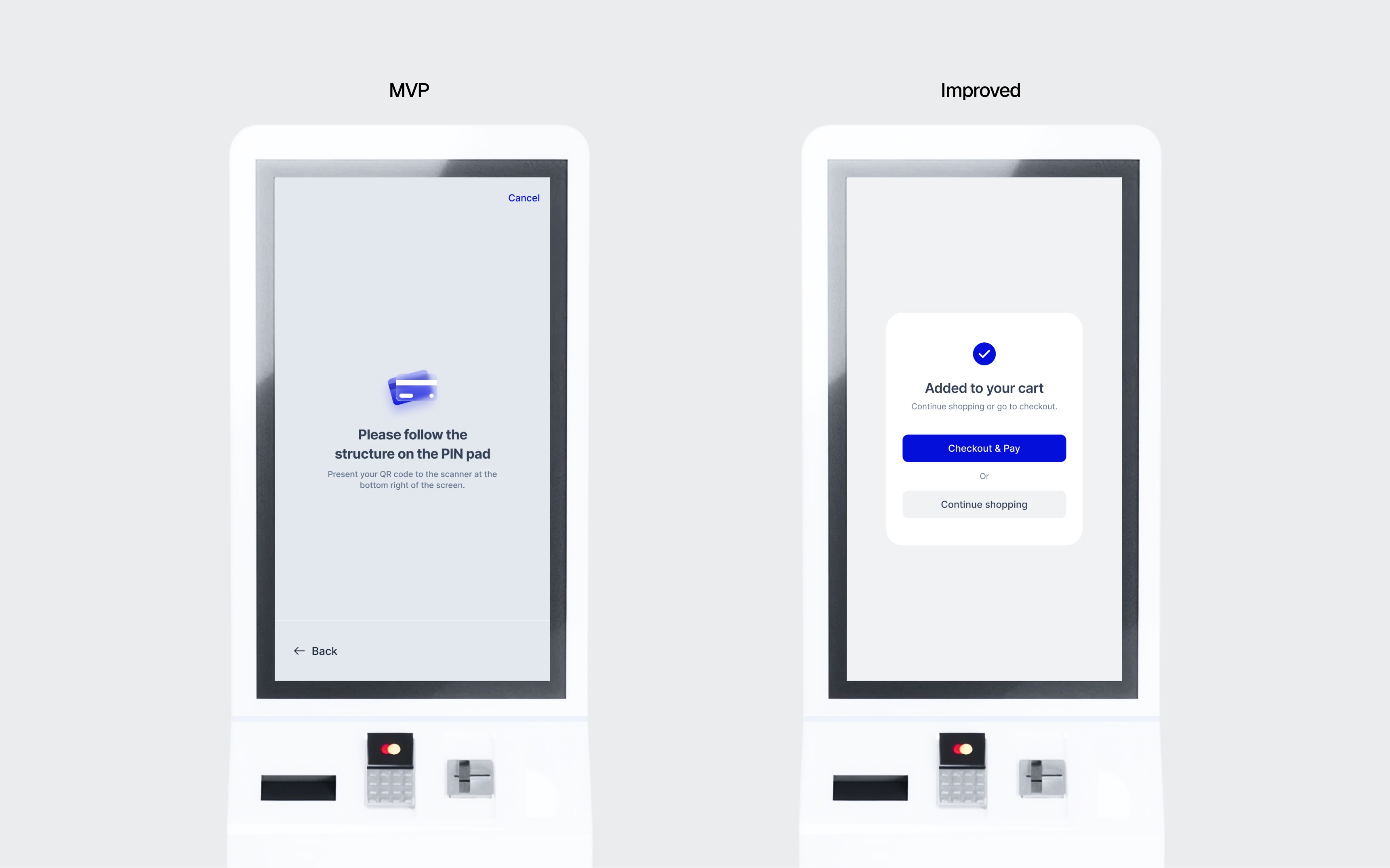
The original flow handled only one product per transaction. No cart, no ability to add multiple ticket types. And when the payment screen appeared, users weren't confident about what to do with the physical card reader.
I added a cart that lets guests select multiple products and pay in one transaction. The payment screen now shows a clear illustration of the card reader with step-by-step guidance. After payment, there's immediate visual confirmation so there's no doubt the transaction went through.
05
The results
HollandPark and beyond
After deploying the improved version at HollandPark, we measured again.
Saved per transaction
More on-site sales
More on-site sales
Major venues
Checkout times dropped by roughly 2 minutes on average based on timed observations before and after the redesign at the same venue. Misclicks, back-navigations, and payment retries dropped by about 40%. And six months after installation, the venue reported a 20% increase in on-site sales compared to the same period the previous year.
These aren't clinical measurements. The checkout and error numbers are rough estimates from observation sessions at HollandPark. The sales increase was self-reported by the venue. But the direction was consistent across every metric, and the venues kept ordering more terminals.
The terminal is now deployed at 7+ venues across Germany, from indoor playgrounds to a butterfly park.
The terminal is still a core Ticketbro product, with the number of deployments continuing to grow.
06
Close
The self-checkout terminal taught me something I keep coming back to: the first version is never the real design. Every improvement in the second version came from spending time in the venue, not in Figma. Watching ten people use something you built will teach you more than any amount of iteration in a prototype.
Self-Checkout Terminal
Self-Checkout Terminal
I designed a kiosk so simple that nobody at the venue needs to explain it.
I designed a kiosk so simple that nobody at the venue needs to explain it.
Saved per transaction
Saved per transaction
Saved per transaction
More on-site sales
More on-site sales
More on-site sales
Venues
Venues
Venues
Info
Role
Sole Product Designer
Platforms
Kiosk / POS (32" touchscreen)
Timeline
~2 months, part-time (2023)
Team
1 Designer, 1 Engineers, PO
Website
01
Background
Why a kiosk
Most of Ticketbro's customers are physical venues: indoor playgrounds, escape rooms, adventure parks. Guests buy tickets online, but plenty still show up without one. At the door, they wait in line while staff manually process walk-in purchases.
The line is the problem. For guests, it's wasted time. For staff, it's repetitive work that pulls them away from the actual visitor experience. For the venue, it's a bottleneck that costs money during peak hours.
The idea: a self-checkout terminal at the entrance. Guests walk up, select their tickets, tap to pay, and get a printed ticket on the spot. No staff interaction needed for a standard purchase.
The terminal runs on a 32” touchscreen with an integrated card reader and thermal printer, all connected to Ticketbro’s existing booking system. Venue operators manage products, schedules, and booking logic through the same platform they already use for online sales, so the kiosk had to stay tightly aligned with that system. The goal was not to copy the online checkout screen by screen, but to keep the logic and flow consistent enough that it felt like part of the same product.
I designed the full checkout experience: from the attract screen that pulls someone in, through every step of the purchase, to the moment the ticket prints.
First deployment at HollandPark, Berlin.
02
The challenge
Designing for everyone
How do you make a six-step booking flow feel obvious on first tap?
A kiosk in a venue lobby isn’t like a phone in someone’s hand. There’s no onboarding. No tutorial. No second session where the user already knows the flow. Every interaction is a first-time interaction.
The user could be a parent with a toddler pulling at their arm, a tourist who doesn’t speak German, or someone who’s never used a self-checkout and isn’t sure they trust it. If the first screen confuses them, they walk to the counter. The kiosk has failed.
The purchase flow has real complexity behind it: product selection, date, time slot, visitor types, optional add-ons, customization, and payment. Removing steps wasn’t an option. The venues needed that flexibility, and the kiosk had to stay aligned with the same booking logic used in Ticketbro’s platform.
So the challenge was not just simplifying screens. It was reducing how much each screen asked the user to process at once, making the next action obvious, and shaping the flow around patterns people already knew. Even though kiosks have their own constraints, people used it more easily when the interaction felt closer to the mobile apps they were already familiar with.
03
The MVP
Ship and learn
I designed the MVP focused on getting the core purchase flow working: select a product, choose a time slot, pick visitor types, and pay. We shipped it to HollandPark in Berlin.
Then we watched. We ran unmoderated observation sessions with about 10 visitors at the venue. No tasks, no instructions. Just people walking up to the kiosk and trying to buy a ticket. We noted where they paused, tapped the wrong thing, or looked around for help. The venue staff shared what they were hearing from guests, too.
Three patterns stood out:
01
Too many choices at once
Several steps asked users to process multiple decisions at the same time. Even when the options were technically clear, the amount of visible choice made the flow feel harder than it needed to.
02
Unclear next action
On key screens, users weren’t always sure where to tap first or what to do next. Too many elements competed for attention, so the flow didn’t guide them strongly enough.
03
Low interaction confidence
Users often weren’t fully sure whether the system had registered their selection or payment. Some tapped again. Others paused and looked around for reassurance.
04
The iteration
What changed and why
Every change in the second version came directly from what we observed. The redesign focused on reducing visible complexity, making the next action clearer on every screen, and using more familiar interaction patterns throughout the flow.
Product selection
The first version showed a flat list of every product with large image cards. Users had to scroll through everything to find their ticket.
I added category tabs at the top and switched to a compact list layout with clear add buttons. Products are grouped by type, and the layout shows more options per screen. The structure feels more familiar, the next action is clearer, and users find what they need with less hesitation.
Time slot selection
The original used a 3-column grid grouped by morning, afternoon, and evening. It looked clean but forced users to scan in a Z-pattern. In testing, people misselected slots or stalled trying to figure out the layout.
I changed it to a single-column list. The current time slot is pre-selected and highlighted with a "Now" tag. Most kiosk users are buying for right now, not next Thursday. The default being correct means most people just confirm and move on.
Pricing and visitors
The first version put visitor counts and customization options on the same screen. Too many decisions at once. Users hesitated over which section to interact with first.
I split this into two screens. The pricing screen handles ticket types and visitor counts only. Customization got its own dedicated step. Each screen has one job. I also introduced multiple price variations defined by venues for more flexibility and users clearer options.
Customization
The MVP used inline radio buttons for customization, mixed in with the pricing screen. As the number of options grew across different venues, this became cluttered and confusing.
I moved customization to a dedicated screen with structured cards. Each option has a clear label and description. For venues with many variations, dropdown selectors replaced radio buttons. Customization options are now tied to individual visitors, so a family can make different selections for each person.
Cart and payment
The original flow handled only one product per transaction. No cart, no ability to add multiple ticket types. And when the payment screen appeared, users weren't confident about what to do with the physical card reader.
I added a cart that lets guests select multiple products and pay in one transaction. The payment screen now shows a clear illustration of the card reader with step-by-step guidance. After payment, there's immediate visual confirmation so there's no doubt the transaction went through.
05
The results
HollandPark and beyond
After deploying the improved version at HollandPark, we measured again.
Saved per transaction
More on-site sales
More on-site sales
Major venues
Checkout times dropped by roughly 2 minutes on average based on timed observations before and after the redesign at the same venue. Misclicks, back-navigations, and payment retries dropped by about 40%. And six months after installation, the venue reported a 20% increase in on-site sales compared to the same period the previous year.
These aren't clinical measurements. The checkout and error numbers are rough estimates from observation sessions at HollandPark. The sales increase was self-reported by the venue. But the direction was consistent across every metric, and the venues kept ordering more terminals.
The terminal is now deployed at 7+ venues across Germany, from indoor playgrounds to a butterfly park.
The terminal is still a core Ticketbro product, with the number of deployments continuing to grow.
06
Close
The self-checkout terminal taught me something I keep coming back to: the first version is never the real design. Every improvement in the second version came from spending time in the venue, not in Figma. Watching ten people use something you built will teach you more than any amount of iteration in a prototype.
Self-Checkout Terminal
Self-Checkout Terminal
I designed a kiosk so simple that nobody at the venue needs to explain it.
I designed a kiosk so simple that nobody at the venue needs to explain it.
Saved per transaction
Saved per transaction
Saved per transaction
More on-site sales
More on-site sales
More on-site sales
Venues
Venues
Venues
Info
Role
Sole Product Designer
Platforms
Kiosk / POS (32" touchscreen)
Timeline
~2 months, part-time (2023)
Team
1 Designer, 1 Engineers, PO
Website
01
Background
Why a kiosk
Most of Ticketbro's customers are physical venues: indoor playgrounds, escape rooms, adventure parks. Guests buy tickets online, but plenty still show up without one. At the door, they wait in line while staff manually process walk-in purchases.
The line is the problem. For guests, it's wasted time. For staff, it's repetitive work that pulls them away from the actual visitor experience. For the venue, it's a bottleneck that costs money during peak hours.
The idea: a self-checkout terminal at the entrance. Guests walk up, select their tickets, tap to pay, and get a printed ticket on the spot. No staff interaction needed for a standard purchase.
The terminal runs on a 32” touchscreen with an integrated card reader and thermal printer, all connected to Ticketbro’s existing booking system. Venue operators manage products, schedules, and booking logic through the same platform they already use for online sales, so the kiosk had to stay tightly aligned with that system. The goal was not to copy the online checkout screen by screen, but to keep the logic and flow consistent enough that it felt like part of the same product.
I designed the full checkout experience: from the attract screen that pulls someone in, through every step of the purchase, to the moment the ticket prints.
First deployment at HollandPark, Berlin.
02
The challenge
Designing for everyone
How do you make a six-step booking flow feel obvious on first tap?
A kiosk in a venue lobby isn’t like a phone in someone’s hand. There’s no onboarding. No tutorial. No second session where the user already knows the flow. Every interaction is a first-time interaction.
The user could be a parent with a toddler pulling at their arm, a tourist who doesn’t speak German, or someone who’s never used a self-checkout and isn’t sure they trust it. If the first screen confuses them, they walk to the counter. The kiosk has failed.
The purchase flow has real complexity behind it: product selection, date, time slot, visitor types, optional add-ons, customization, and payment. Removing steps wasn’t an option. The venues needed that flexibility, and the kiosk had to stay aligned with the same booking logic used in Ticketbro’s platform.
So the challenge was not just simplifying screens. It was reducing how much each screen asked the user to process at once, making the next action obvious, and shaping the flow around patterns people already knew. Even though kiosks have their own constraints, people used it more easily when the interaction felt closer to the mobile apps they were already familiar with.
03
The MVP
Ship and learn
I designed the MVP focused on getting the core purchase flow working: select a product, choose a time slot, pick visitor types, and pay. We shipped it to HollandPark in Berlin.
Then we watched. We ran unmoderated observation sessions with about 10 visitors at the venue. No tasks, no instructions. Just people walking up to the kiosk and trying to buy a ticket. We noted where they paused, tapped the wrong thing, or looked around for help. The venue staff shared what they were hearing from guests, too.
Three patterns stood out:
01
Too many choices at once
Several steps asked users to process multiple decisions at the same time. Even when the options were technically clear, the amount of visible choice made the flow feel harder than it needed to.
02
Unclear next action
On key screens, users weren’t always sure where to tap first or what to do next. Too many elements competed for attention, so the flow didn’t guide them strongly enough.
03
Low interaction confidence
Users often weren’t fully sure whether the system had registered their selection or payment. Some tapped again. Others paused and looked around for reassurance.
04
The iteration
What changed and why
Every change in the second version came directly from what we observed. The redesign focused on reducing visible complexity, making the next action clearer on every screen, and using more familiar interaction patterns throughout the flow.
Product selection
The first version showed a flat list of every product with large image cards. Users had to scroll through everything to find their ticket.
I added category tabs at the top and switched to a compact list layout with clear add buttons. Products are grouped by type, and the layout shows more options per screen. The structure feels more familiar, the next action is clearer, and users find what they need with less hesitation.
Time slot selection
The original used a 3-column grid grouped by morning, afternoon, and evening. It looked clean but forced users to scan in a Z-pattern. In testing, people misselected slots or stalled trying to figure out the layout.
I changed it to a single-column list. The current time slot is pre-selected and highlighted with a "Now" tag. Most kiosk users are buying for right now, not next Thursday. The default being correct means most people just confirm and move on.
Pricing and visitors
The first version put visitor counts and customization options on the same screen. Too many decisions at once. Users hesitated over which section to interact with first.
I split this into two screens. The pricing screen handles ticket types and visitor counts only. Customization got its own dedicated step. Each screen has one job. I also introduced multiple price variations defined by venues for more flexibility and users clearer options.
Customization
The MVP used inline radio buttons for customization, mixed in with the pricing screen. As the number of options grew across different venues, this became cluttered and confusing.
I moved customization to a dedicated screen with structured cards. Each option has a clear label and description. For venues with many variations, dropdown selectors replaced radio buttons. Customization options are now tied to individual visitors, so a family can make different selections for each person.
Cart and payment
The original flow handled only one product per transaction. No cart, no ability to add multiple ticket types. And when the payment screen appeared, users weren't confident about what to do with the physical card reader.
I added a cart that lets guests select multiple products and pay in one transaction. The payment screen now shows a clear illustration of the card reader with step-by-step guidance. After payment, there's immediate visual confirmation so there's no doubt the transaction went through.
05
The results
HollandPark and beyond
After deploying the improved version at HollandPark, we measured again.
Saved per transaction
More on-site sales
More on-site sales
Major venues
Checkout times dropped by roughly 2 minutes on average based on timed observations before and after the redesign at the same venue. Misclicks, back-navigations, and payment retries dropped by about 40%. And six months after installation, the venue reported a 20% increase in on-site sales compared to the same period the previous year.
These aren't clinical measurements. The checkout and error numbers are rough estimates from observation sessions at HollandPark. The sales increase was self-reported by the venue. But the direction was consistent across every metric, and the venues kept ordering more terminals.
The terminal is now deployed at 7+ venues across Germany, from indoor playgrounds to a butterfly park.
The terminal is still a core Ticketbro product, with the number of deployments continuing to grow.
06
Close
The self-checkout terminal taught me something I keep coming back to: the first version is never the real design. Every improvement in the second version came from spending time in the venue, not in Figma. Watching ten people use something you built will teach you more than any amount of iteration in a prototype.